

How to view any Minecraft skin in 3D (username or PNG)
The paper doll in your inventory is fine if you only need to confirm you didn’t accidentally put on a villager nose. It’s less helpful when you’re trying to see how a sleeve reads from the side, or whether a hood looks weird once you start walking. Same goes for checking if your greens vanish against grass.
That’s what a 3D Minecraft skin viewer is for. Look someone up by username, or drop in a PNG, and spin the model around like you’re inspecting a slightly suspicious friend.
Why a 3D preview beats the inventory paper doll
In-game you’re stuck with whatever angle Minecraft feels like giving you that day. Lighting depends on the world. You can’t orbit freely. You can’t freeze an idle pose. You also can’t drop the same skin into snow and the Nether to see if the colours still work.
A browser viewer fills that gap. You get a rotatable Steve/Alex-style model, with front, side, and back camera poses. There are biome backgrounds that aren’t just a dark void, plus a flat 2D layout when you want to nitpick seams. Download and screenshot are there when you want a copy.
Handy for picking a skin before joining a server. Also useful if you’re snooping on a friend’s latest look, or checking a custom PNG before you shove it onto your Mojang account.
Look up a skin by username
If they play Java and have a normal account skin, this takes about as long as typing their name:
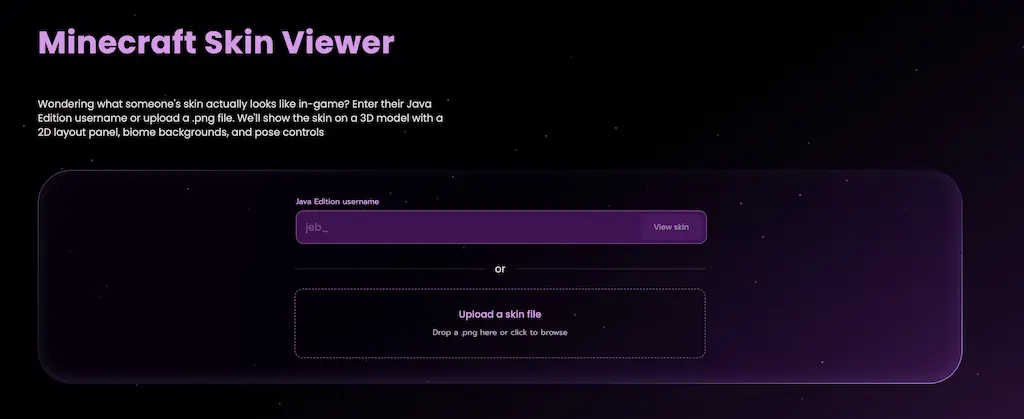
Open the free Minecraft skin viewer
Enter their Java Edition username.
Hit View skin.
You’ll get a 3D model you can drag to rotate. Scroll or pinch to zoom. Works the same way on phone and desktop.
Once it’s loaded, the URL keeps that username. Send the link and anyone can open the same preview. No login required.
Upload a custom PNG from file
Already got the skin as a file? Maybe it came from an editor, a download, or some half-finished experiment sitting in your Downloads folder.
On the same viewer page, find the upload area under the username field.
Drag in a
.png, or click to browse.The model updates. You’ll see an Uploaded label so you know this isn’t a live Mojang skin.
Classic Java layouts (64×64 Steve/Alex) work best. Uploads get the same biomes and poses as username lookups, along with screenshots and the download button. Share links only work for username sessions, though. Your PNG stays on your machine, which is the polite way to handle a file that was never meant to live on our servers.
Biomes, poses, download, and share
Once a skin is up, the controls under the viewer are where it stops being a glorified avatar thumbnail.
Background. Pick Default, Plains, Forest, Desert, Snow, Nether, Ocean, Cherry, or the End. Great for checking whether your outfit disappears into the terrain (looking at you, every dirt-brown cloak in existence).
Poses. Jump between Front, Side, and Back. Drag anytime if you’d rather free-orbit.
Walk / Idle. Motion versus standing still. Some skins only show their crimes when the arms start swinging.
Download. Save the texture as a PNG for editing or backup.
Screenshot. Grab the 3D view with the current biome.
Copy link. Username lookups only. Copies a URL with the player, and the biome if you changed it.
Fullscreen. More room when you’re comparing details.
There’s also a flat 2D panel with the front and back layout, plus the raw texture. Use that when something looks off on an arm and you need to stare at the pixels until your eyes water a little.
Java vs Bedrock skins
This tool is for Minecraft Java Edition. That means Mojang username lookup, plus classic PNG files. Bedrock Marketplace packs are a different beast: different accounts, and often different geometry. Dumping a Marketplace pack into a Java viewer and expecting miracles is how you end up confused and slightly betrayed.
If you’ve exported a standard 64×64 Steve/Alex-style PNG from Bedrock, you can still upload that and preview it here. Full Bedrock Marketplace / geometry support is its own topic. We’ll cover Java vs Bedrock skins properly in a follow-up when that post is live.
Try the free viewer
Go poke around - Open the free 3D Minecraft skin viewer
More free stuff lives on the tools hub. If you need a server to actually wear the skin on, take a look at hosting.


